

At Latticework Insights, we’ve been using Claude extensively for analytics, and it makes our analysts significantly more prolific. We use it a ton for LTV:CAC analytics, which requires us to go very deep with clients very quickly. Over time we’ve packaged that work into a Claude skill calculating LTV:CAC, CAC payback, and retention by cohort using Snowflake as a data warehouse, as well as a methodology for working with data collaboratively across marketing, operations, finance, and data science teams.
The skill ensures we have a clean, consistent data model; a deterministic way of querying the data model and calculating all the metrics; a beautiful, interactive set of dashboards designed to our spec; and a set of evals to ensure everything stays on the rails.
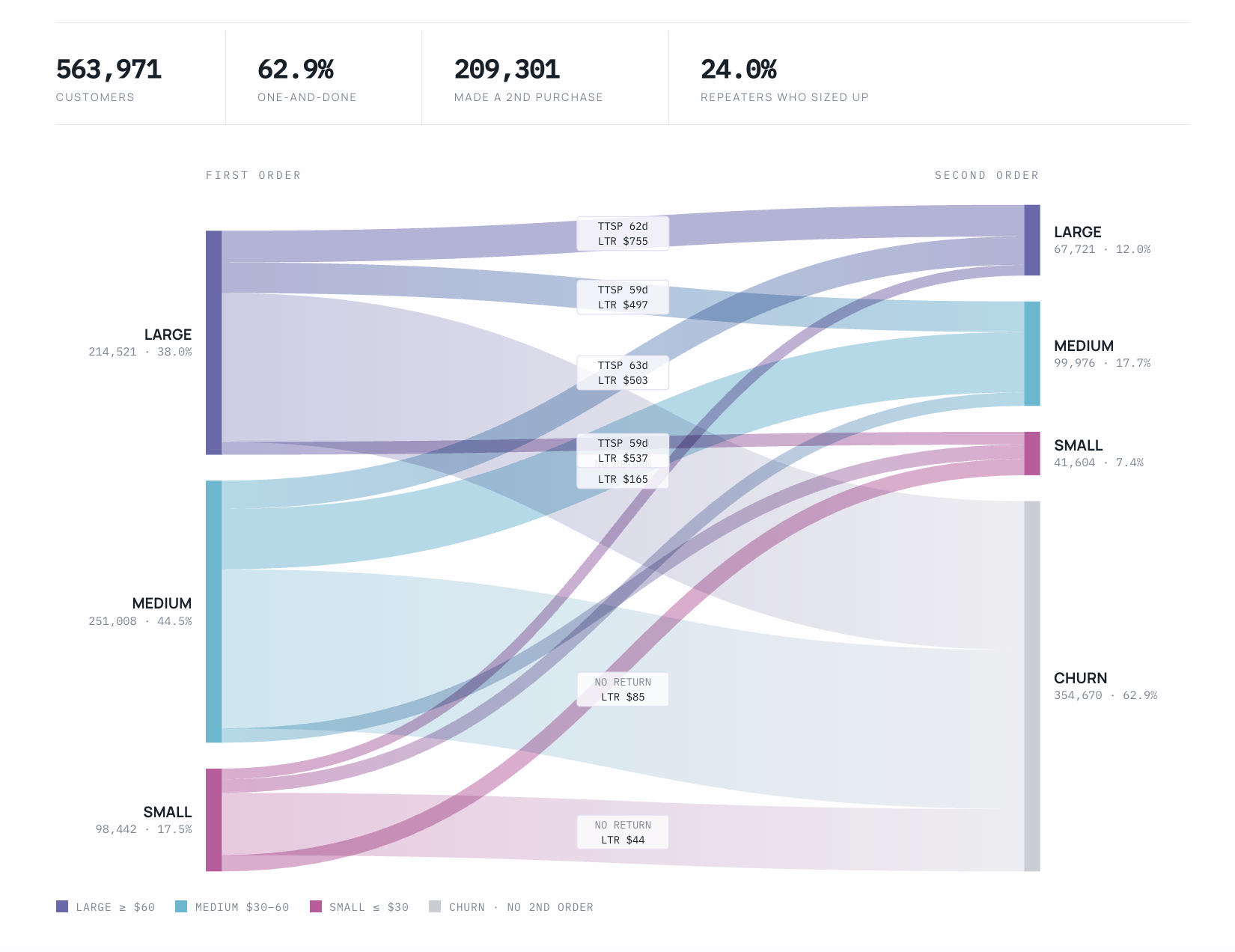
What is a Claude skill?
To set the stage: a Claude skill is just a folder. It holds a SKILL.md file, which is just a text file that houses a name, a description and instructions, plus any python scripts or reference files that the skill needs.
What is the agent-as-a-folder pattern?
A closely related alternative is the “agent-as-a-folder” pattern. Again, simply a folder on your hard drive with a CLAUDE.md, README.md, and TODO.md file, alongside some optional markdown files describing your best-practices or strategies for doing analytics. We’ve also heard this pattern referred to as “context trees” and to an extent “work trees”, but obviously the field is evolving quickly and the nomenclature is still standardizing.
Both strategies are very powerful and flexible. Instead of relying on single prompts, which are limited to plain text, both Claude skills and agents-as-folders allow you to incorporate python scripts, SQL, and reference files like images, previous dashboards you’ve created, and URLs to other work that you like. You might see a directory structure like this one below.
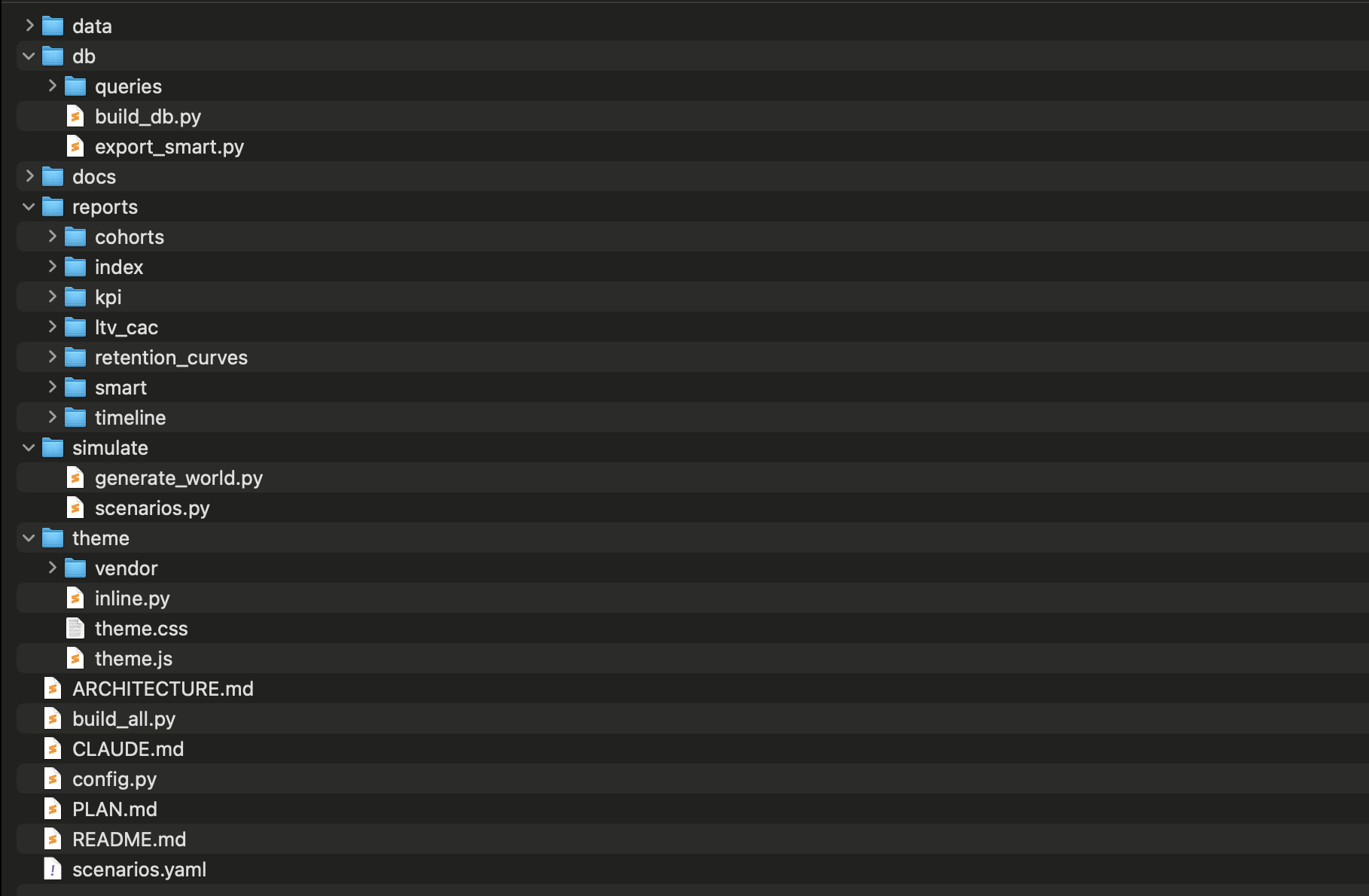
All this extra context allows you to specify the details of how you like to work, how you like to deliver analytics to clients, and what you do and do NOT want the LLM to do for you. It empowers you to build up components over time, just like in traditional software development.
What goes into our LTV:CAC skill?
We’re fanatical about keeping SQL really clean, that way Claude doesn’t improvise the data model feeding the dashboards. We have an ARCHITECTURE.md file to ensure that the overall workflow sticks to best practices that we use when connecting to Snowflake. And we have a design theme for ensuring the highest visual quality of the dashboards.
In our case, we also have a simulation module that generates mock data modeling a $100M retail brand with 10 years of plausible operating history.
How does CAC payback work in the dashboard?
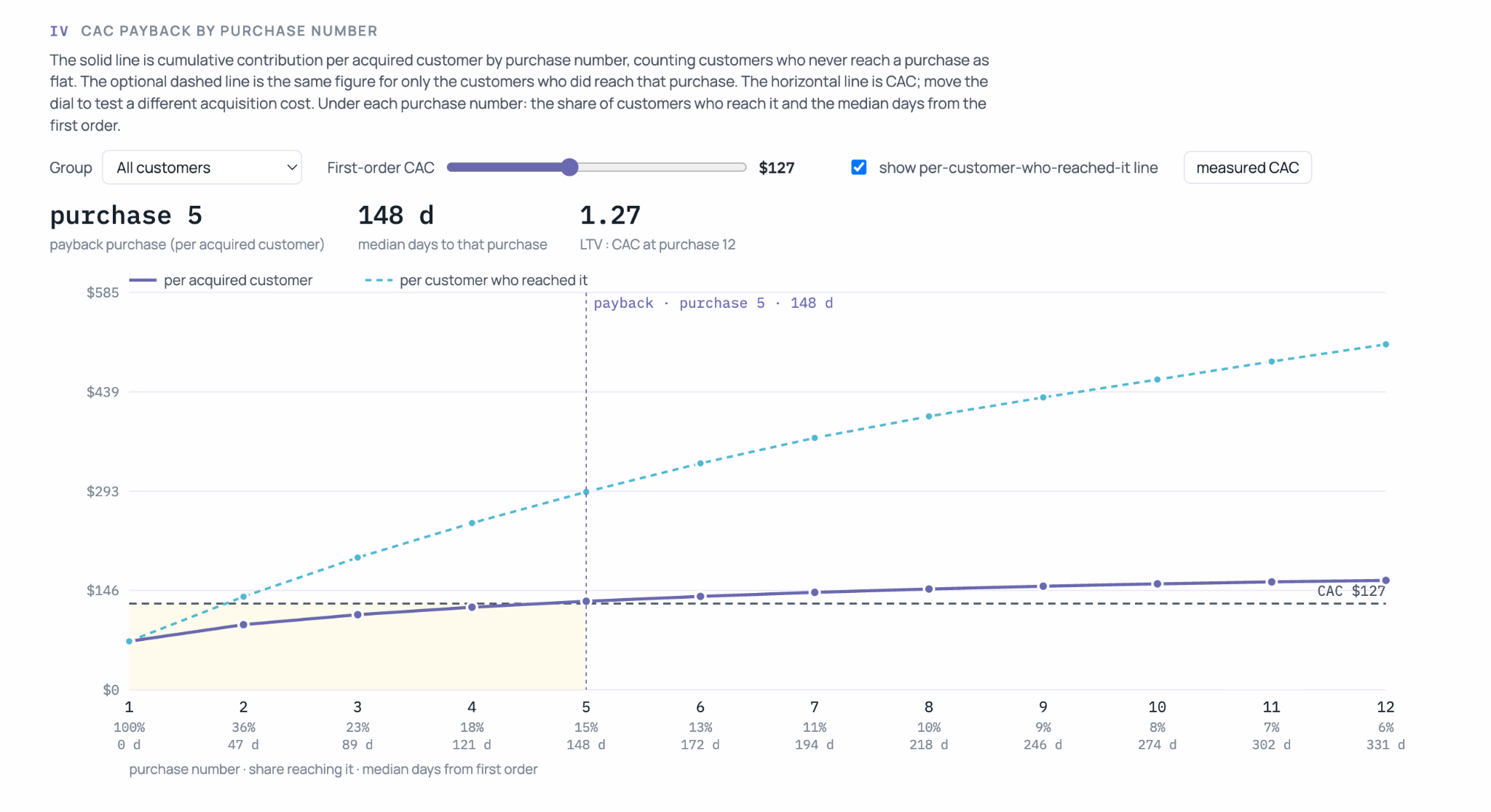
As an analytics philosophy, we believe all dashboards should allow clients to run scenarios. So instead of just looking at yesterday’s numbers, clients can run “What If” scenarios. When you’re doing LTV:CAC analytics, CAC payback is an important dimension, because marketing spend works like debt that repeat purchases pay back. How long that takes depends on the retention curve, and finance uses the answer to decide how much budget to give the marketing team. At a $127 CAC in the chart below, payback arrives at the fifth purchase, a median of 148 days after the first order.
Should you build a Claude skill or an agent-as-a-folder?
Whether you go with a formal Claude skill or an agent-as-a-folder depends on how much you want to formalize.
An agent-as-a-folder is the flexible option. Point Claude Code at a folder, or at several of your old project folders, ask it to read what is there and pick up the context, and it can start working. Nothing needs packaging, and you choose what context to pull in each time. It suits exploratory work and new problems where the method is still changing.
A skill is the formalized option. Once a method works, you package it with a name and a description, and Claude loads it whenever a request matches, without you pointing it at anything. The SQL, scripts and evals are fixed, so the same question gets the same calculation every time. You share it by copying the folder into ~/.claude/skills/ or publishing it as a plugin.
We use both. We start in folders while a method is taking shape, and promote it to a skill once it settles. For LTV:CAC that happened when the SQL and the evals stopped changing.
FAQ
How do I connect Claude to Snowflake to calculate LTV:CAC?
Connect Claude Code to Snowflake through the Snowflake managed MCP server, then install the skill. Set up a read-only Snowflake role limited to your semantic layer containing your sales, customer, and ad spend data, so Claude can run SELECT queries and nothing else.
What data do I need in Snowflake before the skill works?
It is important to create a semantic layer describing clean, consistent schema containing sales, customer, and ad spend data, joined on a customer or acquisition source key. Most Shopify brands get these by loading Shopify, Meta and Google Ads through an ETL tool like Fivetran, or folding less conventional source systems into the semantic layer.
How do I install a Claude Code skill?
Copy your skill folder into your ~/.claude/skills/ directory, so it becomes available to all your projects. Then run the “/skills” command in Claude Code to confirm it is listed. You can also publish a skill as a plugin and install it with “/plugin install”.